A heart, a star, a tiny arrow, a divider. Small marks like these turn a plain line of text into something that looks put together. People add them to Instagram bios, Discord usernames, TikTok captions, WhatsApp statuses and gaming tags, anywhere a plain sentence needs a bit more shape.
Most of these come from Unicode. That’s the character system that keeps text looking the same across different devices. Copy a symbol on your phone, paste it on a laptop, and it should still show up correctly. Unicode covers a lot: punctuation, math signs, currency marks, decorative shapes and stylized letters. Many of these characters have been around long before the internet. Stars and zodiac marks appear in old manuscripts and printed star charts. Arrows and shapes come from technical drawings and old maps. The symbols themselves haven’t changed much. What changed is where people use them now. That’s why a page like this is useful. Instead of digging through keyboard menus or searching for one symbol at a time, you can just browse, copy and paste.
Types of Cool Symbols
Different cool symbols suit different jobs. A crown looks great in a bio, but it looks out of place inside a spreadsheet. Here’s a simple way to sort them.
Stylish symbols
Cute and aesthetic symbols. Hearts, moons, flowers and bows. Common on Pinterest boards, journal pages and softer bio styles.
Gaming name symbols
Brackets, slashes, skull shapes and bold dividers. In Free Fire and PUBG especially, a name built with sharp symbol combinations stands out faster than plain letters do.
Rare symbols
Pulled from lesser known Unicode blocks or older writing systems, good for people tired of seeing the same few hearts on every profile.
Text faces and kaomoji
Things like ( ˘ ³˘) or ¯_(ツ)_/¯. These carry tone more than decoration. Some people stick to one clean symbol. Others use five or six for a busier look. Neither way is wrong. It depends on the platform and how bold you want the name to look.
Choosing Symbols for a Username or Profile Name
Start by thinking about where the name will be used. A business account usually looks better with just one divider or star. A gaming tag can handle more.Watch your character count too. On Instagram and Discord, cool symbols use up space just like letters do. A heavy combination can run out of room faster than expected.If you use the same handle on TikTok, Instagram and Discord, repeating the same symbol style ties the accounts together. It’s a small detail, but it looks intentional instead of random.Stylized letters are also worth trying, especially if a fully decorated name feels like too much. These swap regular letters for different looking Unicode letters, like bold, cursive, gothic or bubble styles, without adding extra marks around the word.
How a Symbol or Font Generator Actually Works?
A generator doesn’t install a new font. It takes the text you type and swaps each letter for a different Unicode character that happens to look bold, cursive or bubbly. The result is still plain text underneath. That’s exactly why you can paste it into a bio, a gaming name or a chat app without anything breaking.
Support isn’t the same everywhere. A common heart or star shows up fine on almost every device. A rarer character might not. Older phones and apps with limited font support sometimes show a blank box instead. If you’re picking a name you plan to keep for a while, paste it into the actual app first and check how it looks.
Where Cool Symbols Get Used?
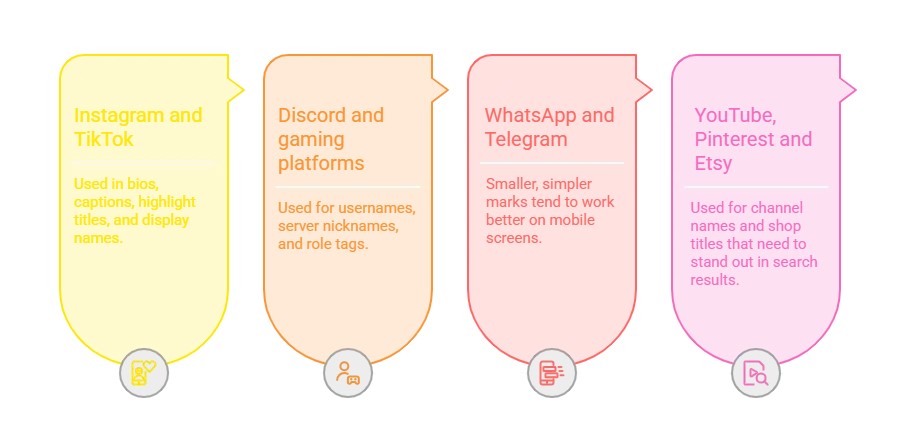
Cool symbols work across all major platforms paste them instantly into Instagram bios, TikTok captions, Discord usernames, WhatsApp statuses, and gaming profiles.
Symbols in Gaming Names
Gaming communities picked up on this trend early. Free Fire and PUBG players build names with brackets, dividers and sharp marks for style, but also for a practical reason. A name like that is easier to spot in a crowded lobby than plain letters buried among similar usernames. Clans often share a matching symbol or prefix across every member, working almost like a badge without needing an actual logo.
There’s no learning curve involved in — you don’t need design experience or any technical background to use these tools effectively, which is part of why they’ve spread so widely among casual users and not just designers or marketers. The cool symbols collection is also maintained and updated regularly, so new categories and trending styles get added as platforms and design trends shift over time. Whether you’re here for a one-time bio update or you check back often for fresh styles, the goal is the same: make it effortless to find the right character and get back to whatever you were creating.
Popular Symbol Categories
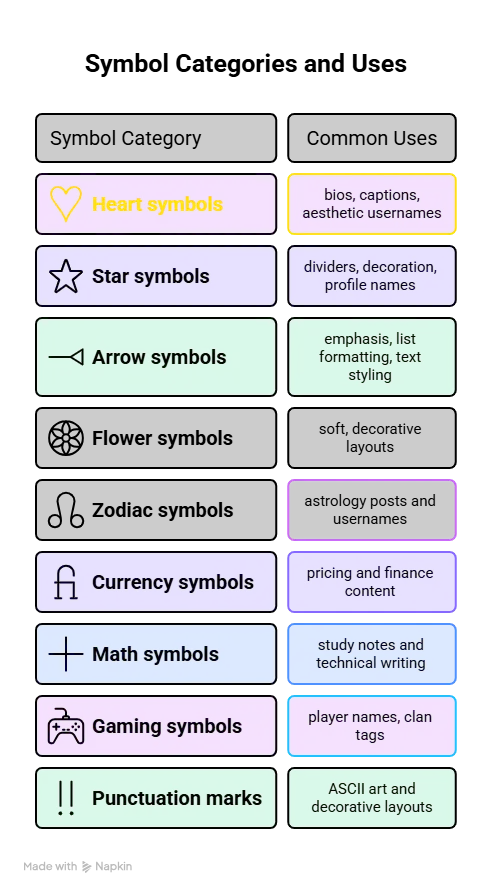
Browse 27+ symbol categories — from heart symbols and star symbols to arrows, zodiac signs, math symbols, and more. Click any symbol to copy instantly.
Typing Special Characters Without Copy and Paste
Copy and paste is usually the fastest method, but it’s not the only one. Windows has Alt codes you can type using the numeric keypad. Mac has a built in Character Viewer with a much bigger set of accents and symbols. On phones, holding down a letter or punctuation key brings up a small menu of related characters.
These built in tools cover the basics well. But for anything beyond that, like rare marks or a full set of dividers side by side, a dedicated symbol page is still faster.
Why Some Symbols Don’t Display Right?
Most common cool symbols work fine on modern phones and browsers. Rare ones are less reliable. An app or device that doesn’t support that part of Unicode might show a blank box or a completely different shape instead. Older phones and browsers are more likely to have this problem than newer ones, since they support fewer Unicode blocks overall.
This is why it helps to test a symbol before using it somewhere permanent, like a username or a shop name. Paste it into the app first and see how it actually looks on your device. If it shows up as a box or a strange shape, it’s best to pick a more common symbol instead, since that same issue could show up for other people viewing your profile too.
Everything you need to know about cool symbols copy & paste
Cool symbols are special characters, signs, and Unicode text marks that you cannot find on a regular keyboard — such as ★ ❤ ✦ ☆ ➡ ♪ and thousands more. On Symboliccool.com, copying them is super easy: just click on any symbol and it is instantly copied to your clipboard. Then simply paste it anywhere — Instagram bio, TikTok caption, Discord username, WhatsApp status, Twitter, or any text field — using Ctrl+V (Windows) or Cmd+V (Mac).
Yes, 100% free! Every single symbol on Symboliccool.com is completely free to copy, paste, and use anywhere you like — no account, no signup, no subscription required. All symbols are based on the Unicode standard, which means they are universal text characters that work on all devices and platforms.
Absolutely! These symbols are Unicode text characters, not images, so they work everywhere text is supported. You can paste them into your Instagram bio, TikTok username or caption, Discord server name or status, WhatsApp status, Twitter/X bio, YouTube channel description, gaming profiles like PUBG, Free Fire, Fortnite, and more. They display correctly on both mobile and desktop.
This happens when the app or website you are pasting into does not fully support Unicode characters, or if the font being used does not include that particular symbol. Try a different symbol from our collection — most popular symbols like ★ ❤ → ✓ are supported everywhere. If you are seeing boxes in an older app or game, try simpler symbols like basic stars, hearts, or arrows which have the widest compatibility.
Symbols are plain Unicode text characters — they are monochrome and look the same on every platform (like ★ ♥ ✓ →). Emojis are colorful, image-based characters whose appearance can vary between platforms like Apple, Android, and Windows (like ❤️ 😊 ⭐). Both are available on Symboliccool.com. Symbols are often preferred for usernames, bios, and decorative text because they are more consistent and universally supported.
Symboliccool.com offers 5,000+ symbols across 27 categories including Star Symbols, Heart Symbols, Arrow Symbols, Currency Symbols, Math Symbols, Zodiac Symbols, Smiley Emojis, Food Symbols, Transport Symbols, and many more. New symbols and categories are added regularly. You can use the search bar at the top to instantly find any symbol you need.
Yes! Symboliccool.com has a Multi-Select Board at the top of the page. Every time you click a symbol, it gets added to the board. Once you have selected all the symbols you want, just click “Copy All” to copy them together in one go — then paste the entire combination wherever you need it. You can also clear the board anytime and start fresh.
The most popular symbols used in Instagram bios include: ★ ✦ ✧ (stars for decoration), ❤ ♥ 💕 (hearts for love or aesthetic), → ➡ ↳ (arrows to point to links), ✓ ✔ (checkmarks for lists), • ‣ ◦ (bullets for spacing), and aesthetic symbols like ✿ ❀ ☾ ⊹. Combining a few of these makes your bio look styled, clean, and eye-catching.
Yes! Symboliccool.com is fully mobile-friendly. Simply open the site on your phone browser, tap on any symbol to copy it, then switch to your app and paste. It works on iPhone, Android, and all modern mobile browsers. No app download needed — just visit the website and start copying symbols instantly.
Unicode is a universal character encoding standard that assigns a unique code to every character and symbol used across all languages and scripts in the world. Cool symbols use Unicode because it means they are actual text characters — not images — so they can be typed, copied, pasted, and displayed anywhere in the world on any device or operating system. Symbols like ★ ❤ ✓ are part of the Unicode standard, which is why they work on Instagram, Discord, games, and everywhere else.
Yes! Many popular games including PUBG, Free Fire, Fortnite, BGMI, Call of Duty Mobile, and others support Unicode symbols in player names and clan tags. Symbols like ★ ✦ ♔ ⚔ ❖ are very popular for making gaming usernames look unique and cool. Simply copy the symbol from Symboliccool.com and paste it directly into the username field of your game.
Use the search bar at the top of the page — just type the name or paste the symbol character you are looking for. You can also type keywords like “heart”, “arrow”, “star”, or “check” to filter symbols instantly. Alternatively, use the Jump to Symbol sidebar on the right side of the page to quickly navigate to any of the 27 symbol categories without scrolling.